The Thing on the Counter
Part one of two. The companion piece on smart displays, The One With the Screen, ran Friday, October 16.
You’ve already decided about this, haven’t you.
Somebody in your family has one. It sits on their counter like a small pillar and they talk to it in a voice slightly louder than the one they use for people, and you’ve watched this happen and thought: not in my house.
I want to take that seriously for a second, because the instinct behind it isn’t foolish. Most people who say no to these are saying no to one of two things — the idea of a microphone that’s always on, or the quiet dread of an afternoon lost to setting the thing up. Both are legitimate. Both are also more manageable than you’ve been led to believe, and the second one is barely a problem anymore.
But I’m not going to open by telling you it’s wonderful. Let me tell you what it’s actually for.
The real argument, which nobody makes
Forget the demonstrations. Forget the man in the commercial dimming his lights.
Here is the entire case: it is the only device in your house you can operate with your hands full, your hands wet, or your hands not cooperating.
That’s it. That’s the whole thing.

You’re elbow-deep in a roasting pan and you need eleven more minutes on a timer. You’re in the garden and you want to know whether it’s going to rain before four. You’re holding a grandchild on one hip. Your reading glasses are in the other room and the print on your phone has become a rumor. Your thumb doesn’t do small buttons on a cold morning the way it did at forty.
Every one of those is a moment where a screen is the wrong tool and a sentence is the right one. That’s not a gadget argument. That’s an ergonomics argument, and it gets more true every year, not less.
The rest — the music, the radio, the podcasts, the news, the reminders, the phone calls — all of that is real and I’ll get to it. But the reason to put one on the counter is that speaking is easier than looking, and it will keep being easier.
It is the only device in your house you can operate with your hands full, your hands wet, or your hands not cooperating.
What changed this year, which is why this is worth writing now
For six or seven years the answer to “which one should I buy” was genuinely complicated. There were cheap ones and middle ones and premium ones in two competing families, and the differences were the kind of thing you needed a chart for.
That ended in 2026, and it ended fast.
In June, Google discontinued both the Nest Mini and the Nest Audio — the entire existing speaker line — and replaced it with a single product: the Google Home Speaker, $99.99, on shelves June 25. One speaker. One price. Alongside it, the Google Assistant you may have spent years learning was retired and replaced by Gemini for Home, a different assistant with a different personality and a different set of abilities.

Amazon, meanwhile, rebuilt its own line around its new assistant. The Echo Dot Max launched at $99.99; Amazon raised it to $119.99 in late August, citing component costs — though it’s discounted often, and it sold for about $80 during Amazon’s October sales. The Echo Studio, the big one, is still $219.99. Both were built for Alexa+, Amazon’s conversational replacement for the old Alexa.
So the decision you’re actually facing is a much simpler one than it used to be: two companies, two assistants, and roughly the same hundred dollars, give or take a sale.
A note before the comparison. Amazon’s older, smaller Echos are discounted hard during its big sales — and that’s the cheapest way to find out whether you’d use one of these at all before committing. There’s no shame in running that experiment.
Amazon Echo — the case for, and the case against
What’s good:
The subscription math, if you’re a Prime member. Alexa+ normally runs $19.99 a month for people who aren’t Prime members. For Prime members it’s included, at no additional cost. If you already pay for Prime — and a great many people over 55 do, for the shipping and the shows — the smarter assistant is simply part of what you’re already buying. That’s the single strongest financial argument in this entire article.
Audiobooks and books read aloud. This is the feature I’d put first for our readers and the one that gets mentioned least. Audible is Amazon’s. Kindle books can be read aloud by the speaker. If you have a library you’ve built up, or if reading print has gotten harder than it used to be, an Echo turns that library into something you can listen to in the kitchen by asking. There is no equivalent on the other side.
You can tell it to slow down. Say “Alexa, speak slower” and it does — there are several speeds, and the setting sticks. If you’ve ever felt that these devices talk like an auctioneer, that’s a fifteen-second fix, and almost nobody knows it exists.
It works with more things. Amazon has had a decade-long head start on third-party devices. Whatever brand of thermostat, lamp, plug, or doorbell you end up with, the odds it speaks Alexa are better than the odds of anything else.
Most of your existing Echos still work. If you already have one from the last several years, Alexa+ reaches it. Only the earliest first-generation models are left behind.

What’s not good, and one item here is serious:
The privacy change, which you should know about before you buy. Echo devices used to offer a setting called Do Not Send Voice Recordings, which kept your audio on the device. Amazon removed that option, effective March 28, 2025. Voice requests now go to Amazon’s cloud to be processed. The device still isn’t recording your whole day — it listens locally for its wake word and sends what comes after — but the choice to keep that audio at home is gone, and it isn’t coming back. You can still review and delete recordings, and you can set them to auto-delete. You cannot opt out of the cloud.
No YouTube Music. Amazon and Google have been at this for years. There is no official YouTube Music on an Echo. If that’s where your music lives, this is close to a dealbreaker, and Bluetooth is your only real workaround.
It will try to sell you things. It’s an Amazon device in an Amazon house. Reordering is always one sentence away. For some people that’s the convenience; for others it’s a slow leak. Know which one you are.
Twenty dollars a month if you’re not a Prime member. The same math that makes it a bargain for Prime members makes it an expensive habit for everyone else.
Google Home Speaker — the case for, and the case against
What’s good:
YouTube, properly. Google owns YouTube. If your listening life runs through YouTube or YouTube Music — and for a lot of people it does, because it’s where the old recordings and the live performances and the strange complete albums are — this is the side that works without a fight.
It handles a real sentence. Gemini for Home is noticeably better at the way people actually talk. You can string requests together — dim the kitchen lights, play something relaxing, and set a timer for twenty minutes — and ask a follow-up without starting over, and correct yourself mid-sentence without being misunderstood. Continued Conversation keeps the microphone open briefly after it answers, so you don’t have to say the wake word again. If what has always annoyed you about these things is having to talk like a robot to be understood, this is the one that fixed that.
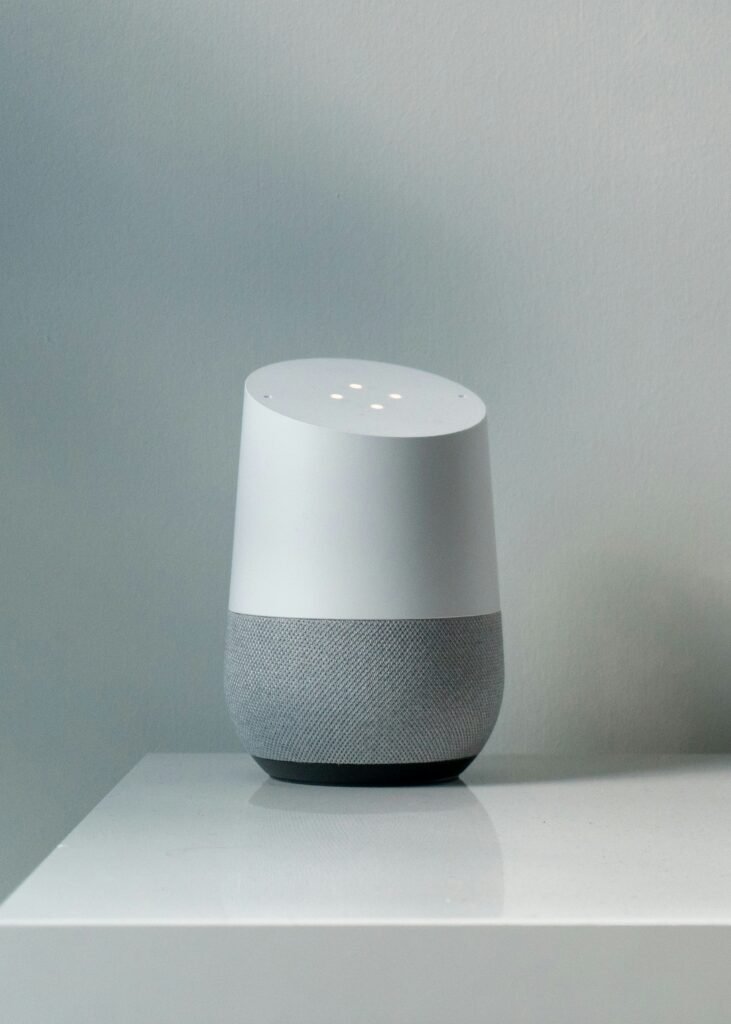
One hundred dollars, one product, 360-degree sound. No chart required. It also pairs with a second speaker for stereo.
It’s the natural fit for an Android phone. Same account, same calendar, same photos, less friction at every step.
What’s not good:
The best parts cost ten to twenty dollars a month. Gemini for Home is free, and the free tier is genuinely capable. But Google Home Premium runs $10/month for the standard tier and $20/month for the advanced one, and that’s where the free-flowing conversational mode and the deeper household features live. There is no version of this where a Prime membership you already pay for covers it.
Google’s track record is the honest concern. I’d be doing you a disservice not to say this plainly. In June, Google discontinued two speakers a lot of people had just bought. The Assistant that people spent six years learning was retired and replaced. Both of those are defensible business decisions, and both of them mean the same thing for you: what you learn on a Google device has a way of changing underneath you. Amazon changed its assistant too, but it didn’t clear its shelf to do it.
If you already own an older Nest speaker, the good conversation costs extra. Gemini has reached the older hardware — including the original Home Mini and the Nest Hub — but on those devices the free-flowing conversational mode requires the $10/month subscription, because the hardware can’t do it alone.
My pick
The Echo Dot Max — $119.99 list, but don’t pay list. That’s the one I’d put on the counter, and I’ll tell you exactly why rather than making you infer it.

Three reasons, in order of how much they matter.
One: the assistant is already paid for. Most people reading this have Prime. Alexa+ is included with it. The Google equivalent is ten to twenty dollars a month, every month, forever. Over three years that’s a difference of several hundred dollars for two devices that do substantially the same job — and I’d rather you spent that on a trip. Even at full price, the twenty-dollar difference on the box is gone in two months of Google’s subscription.
Two: Audible and Kindle. For this audience I think this is the quiet killer feature, and almost nobody writes about it. A library you already own, read aloud, in the room where you cook. Nothing on the Google side matches it.
Three: it plays with everything. Whatever you buy next — a plug, a lamp, a thermostat, a doorbell — the odds it works with Alexa are simply better. You’re not just buying a speaker, you’re picking the side your house will be on for the next several years.
The honest caveat, and I won’t bury it: the Echo is also the device that took away the privacy setting. That’s a real cost and it’s why the placement rule further down isn’t optional advice. I’m recommending it anyway, because the alternative costs money every month and comes from a company that just discontinued its entire speaker line — but you should make that trade knowingly, not because I glossed over it.
Buy the Google Home Speaker instead if your phone is an Android and your music lives on YouTube. In that case you’ll fight with it less every single day, and daily friction beats any feature list.
If you’re deep in Apple — iPhone, iPad, Apple Music — both of these work fine with an iPhone, and Apple’s own speaker is a third option worth a look. An Echo and an iPhone get along without difficulty. The two things they can’t do together are send an iMessage and play Apple Music without linking the account first, and neither is hard to live with.
And if you’re not sure you’d use one at all, buy the cheapest discounted Echo you can find and put it in the kitchen for a month. If it’s still unplugged in a drawer in November, you have your answer, and it didn’t cost you much to find out.
How to actually connect it — the part where people give up
Here’s where nearly everyone gets confused, and it’s not their fault. There are three different things people mean when they say “connect it to my phone,” and they have almost nothing to do with each other.

One: setup. This happens once. Your phone is the remote control you use to introduce the speaker to your home Wi-Fi — the speaker doesn’t run through your phone afterward, it runs on its own.
- Echo, on either iPhone or Android: install the Alexa app, sign in with your Amazon account, plug in the speaker, wait for the ring to turn orange, then in the app tap Devices → + → Add Device and follow the prompts. Your Wi-Fi password is the only thing you’ll need to have handy.
- Google Home Speaker, on either iPhone or Android: install the Google Home app, sign in with your Google account, plug in the speaker, and the app will offer to set up the device it has found. Same idea, same Wi-Fi password.
Ten minutes, and most of that is waiting.
Two: Bluetooth pairing. This is optional, and it’s the thing most people actually picture. It lets the speaker play whatever is already on your phone — anything at all, including apps the speaker doesn’t otherwise support.
- Echo: say “Alexa, pair” — the speaker goes into pairing mode and announces itself. Then open Bluetooth in your phone’s settings and tap the Echo. Afterward, “Alexa, connect my phone” brings it back.
- Google: in the Google Home app, open the speaker, go to its settings, find Audio → Paired Bluetooth devices, and enable pairing mode. Then pair from your phone’s Bluetooth settings as usual.
This is the escape hatch for every “it doesn’t support my app” problem in this article. It’s worth doing on day one.
Three: linking your accounts. This is where the actual payoff lives, and it’s where people quit early because nothing tells them it’s necessary. Until you link them, the speaker can’t reach your music, your audiobooks, your podcasts, or your calendar.
In the Alexa app it’s under More → Settings → Music & Podcasts (and Calendar separately). In the Google Home app, look for Services or Music in settings. Link Spotify, Pandora, Audible, Apple Music, your podcast app, your calendar — whichever of them you use — and then, importantly, set a default music service, so that “play some Sinatra” doesn’t get answered by the wrong app.
Do that once and the difference is night and day. Skip it and the speaker will feel useless, which is exactly why so many of them end up in drawers.
What it’s actually good for, once it’s running
Now the payoff list, and I’d suggest reading it as a set of habits rather than features:
Podcasts and radio. “Play the BBC World Service.” “Play the latest episode of…” Local AM and FM stations, most of them, by name. This is the single most-used function in most households that have one, and it’s the one that turns a kitchen into a place you want to be at seven in the morning.
Audiobooks and books read aloud. Covered above, and worth repeating — on the Amazon side this is the strongest feature nobody advertises to us.
Timers and alarms, plural and named. “Set a timer for the bread.” “Set another one for twenty minutes.” Two, three, four at once, each with a name, each of which it will tell you the remaining time on if you ask. Anyone who cooks will understand immediately why this matters.
Reminders that arrive out loud. Not a notification on a phone in another room. A voice in the kitchen at 4:00 saying the thing you told it to say. For appointments, for medications, for the trash, for calling your sister on her birthday.
Phone calls, hands free. Both platforms will place calls. For someone with arthritis, or in the middle of something, or in a room where the phone isn’t, this is more useful than it sounds.
The small questions. How many tablespoons in a quarter cup. How to spell “liaison.” What year Rear Window came out. What the weather is doing at your daughter’s house. These are the ones that sneak up on you — you don’t plan to use it this way, and then one day you’ve asked it four things before breakfast.
Music, obviously. But go bigger than you think. Full albums, decades, moods, a specific song you half-remember by humming the wrong lyrics at it.
Where to put it, and one privacy rule worth following
Put it in the kitchen. Not the bedroom. Not the home office where you read account numbers into the phone.
This isn’t paranoia, and it isn’t because the device is recording your day — it isn’t. It’s a simpler principle: these things live in the room where you don’t mind being overheard, and for most households that room is the kitchen. It’s also where you’ll use it most, which makes this the rare privacy rule that costs you nothing.
Two more things worth doing on day one. Find the mute button — on both devices it physically cuts power to the microphone, and the ring turns red so you can see from across the room that it’s off. And go into the app and turn on automatic deletion of your voice history. On the Amazon side, given the change I described above, I’d consider that the minimum.
What to do this week
- Decide the Prime question first. If you already pay for Prime, most of this article resolves itself. If you don’t, the Echo’s $19.99 monthly assistant changes the math considerably.
- Check where your music and your books already live. YouTube Music points to Google. Audible and Kindle point to Amazon. Follow your existing library — don’t rebuild it to suit a speaker.
- Buy one. One. Not a set. The kitchen. See what happens in a month.
- Do all three connection steps the day it arrives — setup, Bluetooth pairing, and account linking — and set your default music service while you’re in there. Twenty minutes, once, and it determines whether you love the thing or resent it.
- Then do the only test that counts: go a week and notice what you ask it. Not what the box promised. What you actually asked.
You’ve been told for years that this technology is for somebody younger. It isn’t. It’s for anybody whose hands are full — and that’s a description that fits more of us, not less, as we go.

Next Friday: the screens. Whether a display belongs on your counter instead, and what it does that a speaker can’t. Part two, The One With the Screen, is here.
Go be bold!
Tell me the one thing you ask it most. If you’ve got one already, reply and tell me — I’d bet money it isn’t what you expected when you bought it. And if you don’t, tell me what’s stopping you. I’ll answer the privacy question honestly.
Sources
- Amazon — Echo Dot Max and Echo Studio, built for Alexa+ — launch prices; Echo Studio $219.99
- TechRepublic — Amazon raised Echo, Kindle and Fire TV prices (Aug. 2026) — Echo Dot Max $99.99 → $119.99
- Amazon — Alexa+ is free for Prime members — $19.99/month otherwise
- Amazon — “Alexa, speak slower” — adjustable speech rate
- TechCrunch — Echo sends all voice recordings to the cloud from March 28, 2025 — removal of Do Not Send Voice Recordings
- Google — Meet the new Google Home Speaker — $99.99; June 25, 2026; Continued Conversation
- 9to5Google — Nest Mini and Nest Audio discontinued — June 2026
- Google — Google Home Premium — subscription tiers
- Android Authority — Gemini for Home is free, but its best features aren’t — $10 and $20 tiers
- Google — Get started with Gemini for Home — features overview